In this post, I will provide you with a javascript code sample that transforms headings in a page into a structured table of contents with anchor links.
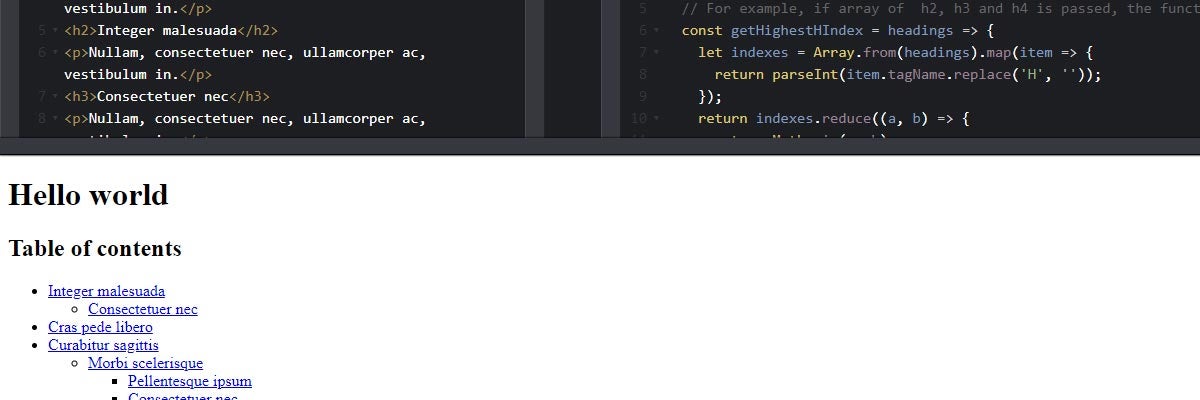
When writing a long structured article, it is always handy for your readers having a table of contents that helps them navigate through it. I composed a javascript code sample that creates such a table of contents on the fly for you. It iterates through the article headings and
- creates anchors for each of them and
- renders a structured unordered list with anchor links.
Here is a link to a working demo on Codepen.
How to make it work?
- In your markup, create an empty ul element (i.e.
<ul class="table-of-contents"></ul>) that will stand for the table of contents. - Copy the Javascript code from the pen or code block below into your project. I wrote the code in ES6 so that you may need to transpile it into ES5 in case you need to use the functionality on the client side. Babel could be a great choice.
- When calling the
tableOfContentsfunction, pass the settings object with selectors for- the headings you want to be part of the table of contents (
headingsSelectorproperty) and - the table of contents wrapper you've created in the first step (
wrapperSelectorproperty).
- the headings you want to be part of the table of contents (
The code
const tableOfContents = (settings) => {
  // Helper function that iterates all headings and returns the highest level.
  // For example, if array of  h2, h3 and h4 is passed, the function returns 2.
  const getHighestHIndex = headings => {
    let indexes = Array.from(headings).map(item => {
      return parseInt(item.tagName.replace('H', ''));
    });
    return indexes.reduce((a, b) => {
      return Math.min(a, b);
    });
  };

  // Iterates passed headings, gets their inner HTML and transforms it into id
  const createAnchors = (settings) => {
    let headings = document.querySelectorAll(settings.headingsSelector);
    headings.forEach(item => {
      let anchorName = item.innerHTML.toLowerCase().replace(/(<([^>]+)>)/ig,'').replace(/\W/g,'-');
      item.setAttribute('id', anchorName);
    });
  };

  // Iterates passed headings and creates unordered list with anchor links reflecting heading levels
  const createTableOfContents = (settings) => {
    let headings = document.querySelectorAll(settings.headingsSelector);
    let tableOfContentsWrapper = document.querySelector(settings.wrapperSelector);
    let tableOfContents = '';
    let prevHeadingLevel = getHighestHIndex(headings);
    headings.forEach(item => {
      let headingLevel = parseInt(item.tagName.replace('H', ''));
      if (prevHeadingLevel > headingLevel) {
        tableOfContents += '</ul>';
      }
      if (prevHeadingLevel < headingLevel) {
        tableOfContents += '<ul>';
      }
      tableOfContents += `<li><a href="#${item.getAttribute('id')}">${item.innerHTML}</a></li>`;
      prevHeadingLevel = headingLevel;
    });
    tableOfContentsWrapper.innerHTML = tableOfContents;
  };

  createAnchors(settings);
  createTableOfContents(settings);
};

// Init table of contents
tableOfContents({
  headingsSelector: 'h2:not(.do-not-render), h3, h4',
  wrapperSelector: '.table-of-contents'
});
Further reading
all posts- Front-end & JavaScript
Why I don't use Bootstrap or any other complex UI framework
In the past, I have developed quite a few sites using Bootstrap. After a while, I came to a decision not to use it because I saw a lot of problems related to slicing sites using Bo…
Xperience by Kentico Headless channel & Next.js: CMS setup (Part 2)
We began this article series by exploring the key aspects of Headless CMSs and their role in Xperience by Kentico. Throughout the series, we will demonstrate how to integrate a Hea…
Xperience by Kentico Headless channel & Next.js: Data fetching and rendering (Part 5)
In this final part of the series, we continue exploring the building blocks of the Next.js application and outline the actual implementation of fetching data from the Xperience by …