For any kind of form web parts, I like using update panel to avoid full page reload when the form is submitted. In such situation, a postback is invoked. When you execute a Javascript code on page load, it won't run after postback. In this post, I will provide you with a code snippet that fixes this issue.
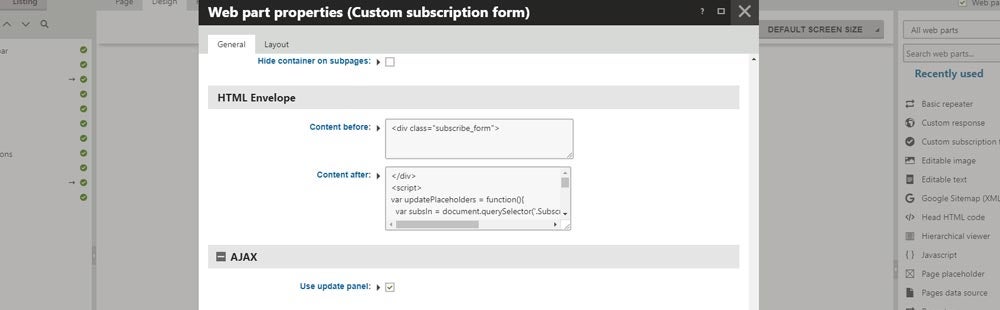
I recommend using update panel mostly for UX reasons. When a visitor submits a form, just the form gets updated instead of the whole page. The visitor doesn't lose focus and receives an instant response. Update panel could be activated for a web part in its web part properties in the AJAX section.
A problem comes into play when you execute a Javascript code that manipulates the form. It won't run if you initialize the script using, for example, self-invoking functions or the document ready event in case of using jQuery.
// These won't work after postback
(function () {
    // Your functionality here
})();

$(document).ready(function () {
    // Your functionality here
})
Instead, you need to, let's say, re-register the script on postback. Below, see an example that demonstrates the usage.
- Create a function that does the desired functionality.
- Execute the function on page load.
- Re-run the function after postback.
// 1. Create a function that does the desired functionality
var yourFunction = function () {
    // Your functionality here
};

// 2. Execute the function on page load
yourFunction();

//3. Re-run the function after postback
var prm = Sys.WebForms.PageRequestManager.getInstance();
if (prm != null) {
    prm.add_endRequest(function (sender, e) {
        if (sender._postBackSettings.panelsToUpdate != null) {
            yourFunction();
        }
    });
};
Further reading
all postsSafe attachment URLs resolution in srcset attribute in Page Builder in Kentico Xperience 13
In this post, I will provide you with a quick tip on how to fix the attachment URLs resolution in srcset attribute in Page Builder in Kentico Xperience 13.
Setting Up a Solution for Integrating Custom Code in Xperience by Kentico on macOS
In this article, I will guide you through setting up a solution for integrating custom code into an Xperience by Kentico project while developing on macOS.
- Front-end & JavaScript
Simple cookie bar
EU cookie legislation requires website owners to inform visitors about the use of cookies. In this article, I will provide you with a simple solution of an informative cookie bar.