If your website is hosted on Kentico’s SaaS platform and you’re using Lucene for search functionality, you may have noticed search index issues after deployments. In this article, I’ll explain the cause of this problem and walk you through a solution for automating search index rebuilds to keep everything running smoothly.
If you’re working with the following setup:
- Your website is built with Xperience by Kentico.
- You’re using the
Kentico.Xperience.LuceneNuGet package to allow visitors to search content. - The website is hosted in Kentico’s SaaS environment.
You might encounter an issue where search indexes have fewer or no entries after every deployment. This, of course, is far from ideal!
What’s the Cause?
This is actually a known feature gap in Xperience by Kentico. Since search indexes are stored on the file system, each deployment to the SaaS environment results in the website running on a different Azure App Service slot. The consequence? The search index is either empty or outdated from a previous deployment.
The Solution: Rebuilding Search Indexes
To ensure your search index is always up to date, you need to rebuild it after every deployment. You have two main options:
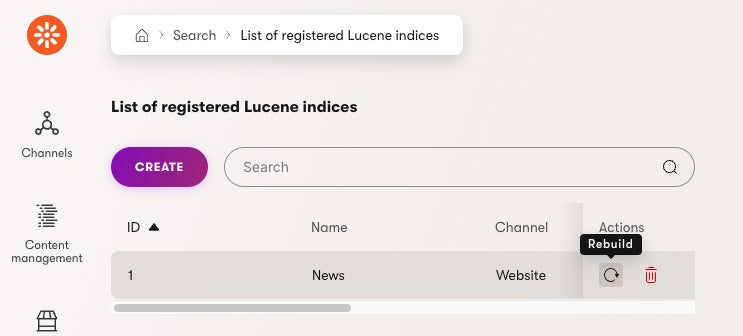
- Manual Rebuild via the Xperience UI.
- Automated Rebuild triggered once the deployment is finished.
If you’re comfortable with manually rebuilding the index, you can simply do so after each deployment. It’s a quick fix, and you’ll be good to go.
Why Automation is the Better Option
For me, manually triggering the rebuild is inconvenient. Deploying to SaaS takes around 30 minutes, and it’s easy to forget to click the rebuild or not have time to wait for the process to finish. That's why I opted for automation.
My Approach: Automated Index Rebuild
I automated the rebuild by handling the ApplicationEvents.PostStart global event and using the ILuceneClient to rebuild the search index when the application starts. You can find the full code below or in my GitHub gist.
using CMS;
using CMS.Base;
using CMS.Core;
using CMS.DataEngine;
using Kentico.Xperience.Lucene.Core.Indexing;

[assembly: RegisterModule(typeof(RebuildIndexPostStartModule))]

public class RebuildIndexPostStartModule : Module
{
    private ILuceneClient? luceneClient;
    private IEventLogService? eventLogService;

    public RebuildIndexPostStartModule()
        : base("RebuildIndex")
    {
    }

    protected override void OnInit()
    {
        base.OnInit();

        luceneClient = Service.Resolve<ILuceneClient>();
        eventLogService = Service.Resolve<IEventLogService>();

        if (eventLogService != null)
        {
            eventLogService.LogInformation(nameof(RebuildIndexPostStartModule), nameof(OnInit), "RebuildIndexPostStartModule initialized");
        }

        ApplicationEvents.PostStart.Execute += (sender, e) => Task.Run(() => RebuildIndex());
    }

    private async Task RebuildIndex()
    {
        try
        {
            if (luceneClient != null)
            {
                await luceneClient.Rebuild(Constants.NewsSearchIndex, null);
            }

            if (eventLogService != null)
            {
                eventLogService.LogInformation(nameof(RebuildIndexPostStartModule), nameof(RebuildIndex), "RebuildIndexPostStartModule finished");
            }
        }
        catch (Exception ex)
        {
            if (eventLogService != null)
            {
                eventLogService.LogException(nameof(RebuildIndexPostStartModule), nameof(RebuildIndex), ex);
            }
        }
    }
}
Note: I recommend placing this customization code in a separate project within your solution. For details on preparing your solution for customization, check out my dedicated article.
Limitations of this Approach
While this method works, it’s not perfect. The global event handler triggers on every application start, not just after deployments. For example, the application pool could recycle, and the event could fire. Based on my testing, in Kentico's SaaS environment, this happens roughly once a day. So, if you implement this solution, expect the search index to rebuild at least daily.
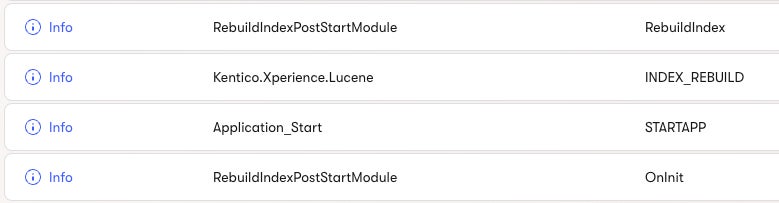
If your index is small, this shouldn’t be an issue. For larger indexes, I recommend testing to ensure there are no performance impacts.
At the moment (late 2024), there’s no reliable way to detect whether the application start event was caused by a deployment or something else, like a pool recycle.
An Alternative Solution
I discussed this with Kentico’s Evangelist, Sean Wright, who suggested a more advanced approach. While it's more challenging to implement, it’s worth considering. Feel free to check out our full discussion.
Conclusion
In this article, we discussed how to handle search index issues in Kentico's SaaS environment, identified the cause, and provided options for rebuilding the index, including an automated solution using the ApplicationEvents.PostStart event. We also highlighted the method’s limitations and suggested alternative approaches for larger projects.
Further reading
all postsBoost Conversions: Persist Form Data After Redirect in Xperience by Kentico
When users submit a form and are redirected to a thank-you page, a fundamental challenge emerges: the form submission data vanishes. This happens because HTTP redirects are statele…
Hiding a widget property in Kentico Xperience 13 Admin
In this post, I will share a tip on how to hide a widget property in the Xperience Admin 13 while it is still available in the backend code.
- Kentico Xperience
How to add a column to UniGrid in Kentico admin
In this post I will show you the way how to add a column to a UniGrid table in Kentico admin on an example of Product coupons.